Project Brief Tips
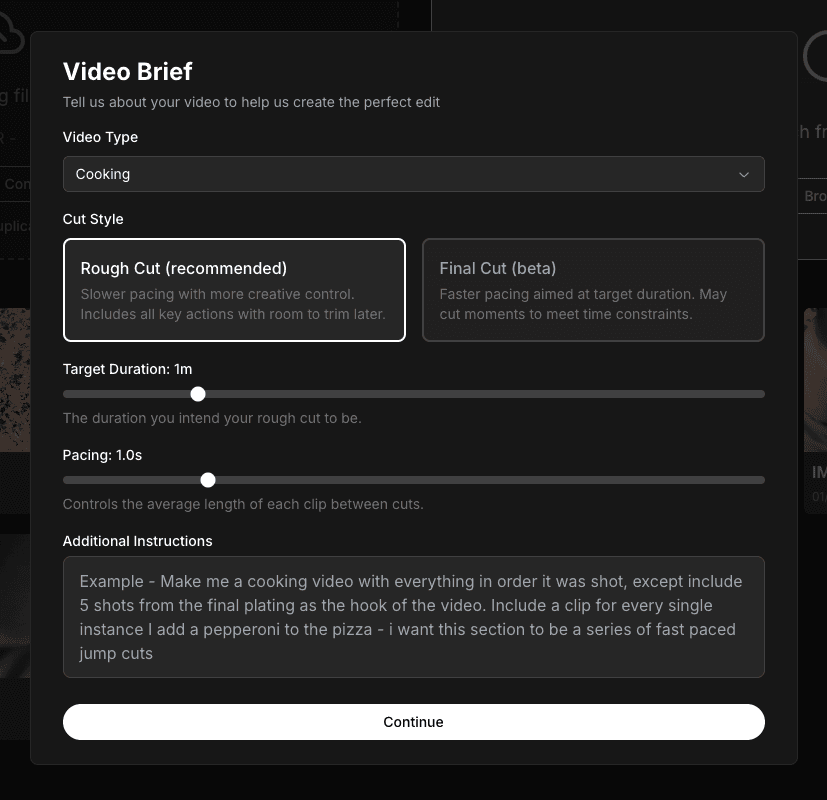
The Video Brief is your opportunity to guide Clik's AI on how to edit your video. A well-written brief helps the AI understand your vision and create a rough cut that's closer to what you want, saving you time on revisions.
Choosing Your Video Type
Start by selecting the video type that best matches your content:
Cooking - For recipe videos, cooking tutorials, and food preparation content. The AI will detect ingredients, recipe steps, and cooking actions.
Vlog/Day in the Life - For lifestyle content, daily vlogs, and personal storytelling videos.
Talking Head - For interviews, tutorials, presentations, and any video where someone is speaking to camera.
Custom - For other types of content or if you want to provide completely custom instructions.
Rough Cut vs Final Cut
Choose your cut style based on how much control you want:
Rough Cut (Recommended) - Keeps all key actions with room for you to trim later. The pacing is slower, giving you more creative control. This is the best choice if you want to refine the edit yourself.
Final Cut (Beta) - Aims for faster pacing at your target duration. May cut moments to meet time constraints. Choose this if you want a more aggressive edit that's closer to your final length.
Setting Target Duration and Pacing
Use the Target Duration slider to tell Clik how long you want your rough cut to be. This is flexible—you can always adjust later—but it helps the AI decide which moments to prioritize.
The Pacing slider controls how much time the AI leaves between cuts. Slower pacing (higher numbers) means more breathing room. Faster pacing (lower numbers) creates quicker, more energetic edits with tighter cuts.
Writing Effective Additional Instructions
The Additional Instructions box is where you can be specific about what you want. Here are some tips:
Be specific about structure - "Include all ingredient prep at the beginning" or "End with the final plating sequence"
Request specific moments - "Include a clip every time I add an ingredient" or "Show the knife cuts in detail"
Define your style - "Create fast-paced jump cuts for repetitive actions" or "Keep a calm, relaxed pace throughout"
Set boundaries - "Don't skip any dialogue" or "Remove all shots of the cutting board"
The more detail you provide, the better the AI can understand your vision. Think of it like briefing a human editor—what would you want them to know about your video?
After Submitting Your Brief
Once you submit your brief, Clik generates a detailed editing prompt based on your inputs. You can review and edit this prompt before the AI starts working. This is your last chance to refine instructions, so read through it carefully and adjust anything that doesn't match your vision.