Export an MP4
When your video is edited and ready to share, export it as an MP4 file. This creates a standard video file you can upload to YouTube, Instagram, TikTok, or any other platform. Clik renders your video with all edits, captions, and effects baked in.
Starting an MP4 Export
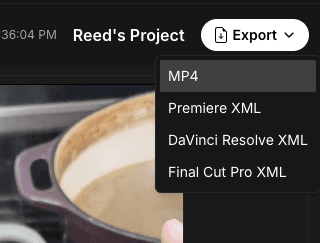
Click the "Export" button in the top right corner of the editor. A dropdown menu appears with export options. Select "MP4" to begin rendering your video.
Clik will start processing your video in the background. You'll see a notification that your export has started, and you can continue working on other projects while it renders.
Export Processing
The rendering process converts your timeline into a final video file. Clik:
Combines all your video clips in the correct order
Applies any resizing, rotation, and positioning
Burns in captions and text overlays
Mixes audio tracks together
Returns a 1080p MP4 file
Export time depends on your video length and complexity. A simple 1-minute video typically renders in a minute or too, while longer videos with many effects may take longer.
Download Your Video
When your export completes, a download will begin automatically. The MP4 file downloads to your browser's default downloads folder.
Note on Popup Blockers: If you have popup blockers enabled in your browser, the automatic download may be blocked. If this happens, check your tasks window in Clik to manually download your MP4 file once the export is complete.
Checking Export Status
You can monitor export progress from the tasks window. This shows:
Current export status (processing, completed, or failed)
Progress percentage if still rendering
Download link when complete
Any error messages if something went wrong
If an export fails, you'll see an error message explaining what happened. Common issues include very large file sizes or connection problems. Try exporting again, or contact support if the problem persists.
What's Included in Your Export
Your MP4 export includes:
All video clips from your timeline at full quality
Captions burned into the video
Text overlays and graphics
All audio tracks mixed together
Any resizing, rotation, or effects applied
The exported video matches exactly what you see in Clik's preview canvas, so there are no surprises when you download your file.
Video Quality
Clik exports at 1080p by default. This format is optimized for speed and maximum resolution for Instagram. Please reach out if you would like to export at a different resolution.
After Exporting
Once downloaded, your MP4 file is ready to use anywhere:
Upload directly to social media platforms
Share via email or cloud storage
Use in presentations or websites
Archive for your records
The file is yours to use however you need. You can export the same project multiple times if you want different versions or make changes after the first export.